
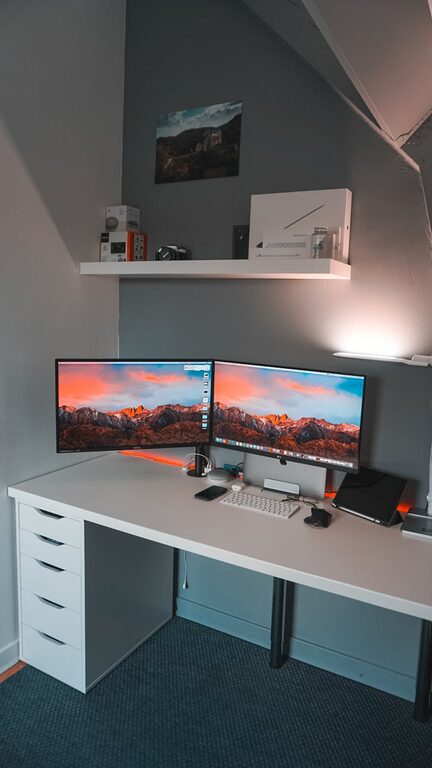
Creating a clutter-free workspace at home can significantly improve your focus, efficiency, and overall comfort while working. Whether you have a dedicated office or a small corner in your living room, organizing your workspace doesn’t have to be overwhelming. With a few simple and practical tips, you can transform your area into an inviting, productive environment.
Why a Clutter-Free Workspace Matters
A cluttered space often leads to a cluttered mind. When your desk is piled with papers, random items, or outdated supplies, it can be hard to concentrate on your tasks. A tidy workspace reduces distractions, helps you find what you need quickly, and can even reduce stress. Plus, it creates a welcoming atmosphere where you’re more likely to enjoy spending time working.
Step 1: Declutter Your Space
Start by clearing everything from your workspace. Sort through papers, supplies, and equipment.
– Keep only what you need: Identify the tools and materials you use daily.
– Remove unnecessary items: Donate, recycle, or throw away anything that’s no longer helpful.
– Sort items into categories: Group similar things to make organizing easier later.
This initial decluttering is an important foundation for maintaining an organized workspace.
Step 2: Use Smart Storage Solutions
After decluttering, consider how you store the items you need to keep.
– Desk organizers: Invest in trays, pen holders, and drawer dividers to keep supplies neat.
– Shelves and filing cabinets: Use vertical space for books, files, or boxes to keep your desk surface clear.
– Clear containers: Transparent bins help you see what’s inside without opening them.
– Label items: Labeling drawers and containers makes locating things faster and keeps your system intact.
Choosing storage solutions that suit your needs and space will help you maintain order.
Step 3: Keep Essentials Accessible
Keep the tools you use the most within easy reach to avoid cluttering your desk with items you rarely need.
– Frequently used items: Place pens, notebooks, or your planner on your desk or in a nearby organizer.
– Occasional items: Store items you need occasionally in drawers or shelves.
– Digital tools: Minimize physical clutter by using apps and digital calendars instead of paper.
Prioritize easy access to what you need while keeping other items neatly tucked away.
Step 4: Establish Daily Maintenance Habits
A clutter-free workspace isn’t a one-time project. Small daily habits help keep your area tidy.
– End-of-day routine: Spend 5 minutes straightening your desk, filing papers, and putting away supplies.
– Keep only active projects out: Once a project finishes, file or remove related materials.
– Limit non-work items: Avoid accumulating personal items or random objects on your desk.
These habits can prevent clutter from building up again over time.
Step 5: Optimize Your Layout
How you arrange your workspace affects productivity and comfort.
– Ergonomic setup: Position your chair, desk, and computer to keep good posture.
– Natural light: Place your desk near a window if possible to boost mood and reduce eye strain.
– Clear pathways: Make sure your workspace is easy to move around without obstacles.
– Personal touch: Add a plant or a small personal item to make the space inviting without overcrowding.
A well-organized layout supports both your productivity and well-being.
Step 6: Digital Decluttering
Organizing your physical workspace is important, but don’t forget your digital environment.
– Organize files: Create folders and subfolders that make sense for your work.
– Delete unused files: Remove duplicates or outdated documents.
– Use cloud storage: It frees up physical space and helps keep everything accessible.
– Manage your inbox: Set rules to sort emails, unsubscribe from unnecessary lists, and keep your mailbox tidy.
A clean digital workspace complements your physical one.
Additional Tips to Stay Organized
– One in, one out rule: When adding new items, remove an old one to avoid accumulation.
– Use a planner or to-do list: Keeping track of tasks prevents paper clutter.
– Regularly reassess: Schedule a weekly or monthly review of your workspace and make adjustments.
– Create designated zones: Separate areas for computer work, paperwork, and other tasks can help keep you focused and organized.
Final Thoughts
Organizing a clutter-free workspace at home doesn’t require expensive tools or a complete overhaul. By decluttering, using proper storage, maintaining good habits, and optimizing your layout, you can create a space that helps you work better. Remember that consistency is key — a few minutes each day to tidy up can make a big difference over time.
With these simple tips, you’re on your way to enjoying a neat, productive work environment right at home!